To write a product requirements document (PRD) with AI, don't ask the AI to write the PRD. Ask it to interview you first, then have it draft the document section by section from your answers, and finally use it as a critic that looks for gaps, contradictions, and untestable requirements. For an MVP, a good PRD is short: problem, users, goals, scope with explicit exclusions, requirements written as acceptance criteria, constraints, risks, and open questions. If a requirement can't be tested, it isn't finished.
This guide includes a lean PRD template, the prompts for each stage, and a worked example.
What a PRD is for when AI is building the product
A PRD has always been the shared definition of what to build and why. When the "team" includes AI coding tools, it gains a second job: it becomes the context those tools work from. That changes what a good PRD looks like.
- Precision matters more than prose. AI tools follow instructions literally and fill gaps with guesses.
- Exclusions matter as much as features. An AI tool won't know a feature is out of scope unless you say so.
- Requirements need to be checkable. Acceptance criteria let you verify AI output without reading every line of code.
- Problem statement: what is broken today, for whom, and what it costs them
- Target users: one primary user described specifically; secondary users if any
- Goals and success metrics: the outcome the MVP must achieve, with a number
- Value proposition: one sentence
- Scope: must have, should have, and not in this version (with reasons)
- Requirements: each feature with acceptance criteria
- Non-functional requirements: performance, security, privacy, accessibility, platforms
- Constraints: budget, deadline, compliance, technology preferences
- Assumptions and risks: what must be true for this to work, and what could stop it
- Open questions: decisions not yet made, with an owner
- Weak: "Users can easily select stores."
- Strong: "Users can select multiple stores from a list showing name and location."
- Weak: "Prices are up to date."
- Strong: "Each price shows the date it was last updated."
- Security and privacy: what personal data you store, who can access it, GDPR or other obligations
- Performance: what "fast" means for your core action (for example, comparison results in under two seconds)
- Platforms: which phones, browsers, screen sizes
- Accessibility: minimum standards you'll meet
- Budget and hosting limits: monthly ceiling for infrastructure
- Technology preferences: anything that must or must not be used
- Accepting polished vagueness. Fluent writing hides empty requirements. Look for words like "seamless," "intuitive," and "robust," and replace them with checkable statements.
- Feature lists without priorities. Everything looks equally important until you sort it.
- No success metric. Without a number, you can't tell whether the MVP worked.
- One giant document per prompt. Drafting section by section gives you a chance to correct course.
- Letting the PRD go stale. Update it when decisions change, because your AI tools will keep reading it.
A 30-page enterprise PRD template isn't the goal. For a startup MVP, two to four pages is usually enough.
A lean PRD template for MVPs
Use these sections in this order.
Step 1: Have the AI interview you
Start with a prompt that makes the AI ask instead of write:
I'm writing a PRD for an MVP. Interview me before drafting anything. Ask about the problem, the primary user, how they solve it today, the success metric, what's out of scope, data sources, accounts, payments, compliance, and the biggest risk. Ask one question at a time. If an answer is vague, ask a follow-up.
Expect ten to fifteen questions. Answer them in full sentences with real details. A vague answer here becomes a vague requirement later.
Step 2: Draft the brief sections first
Ask the AI to draft only the first four sections (problem, users, goals, and value proposition) from your answers. Read them carefully before moving on. These sections are the foundation every requirement will be judged against.
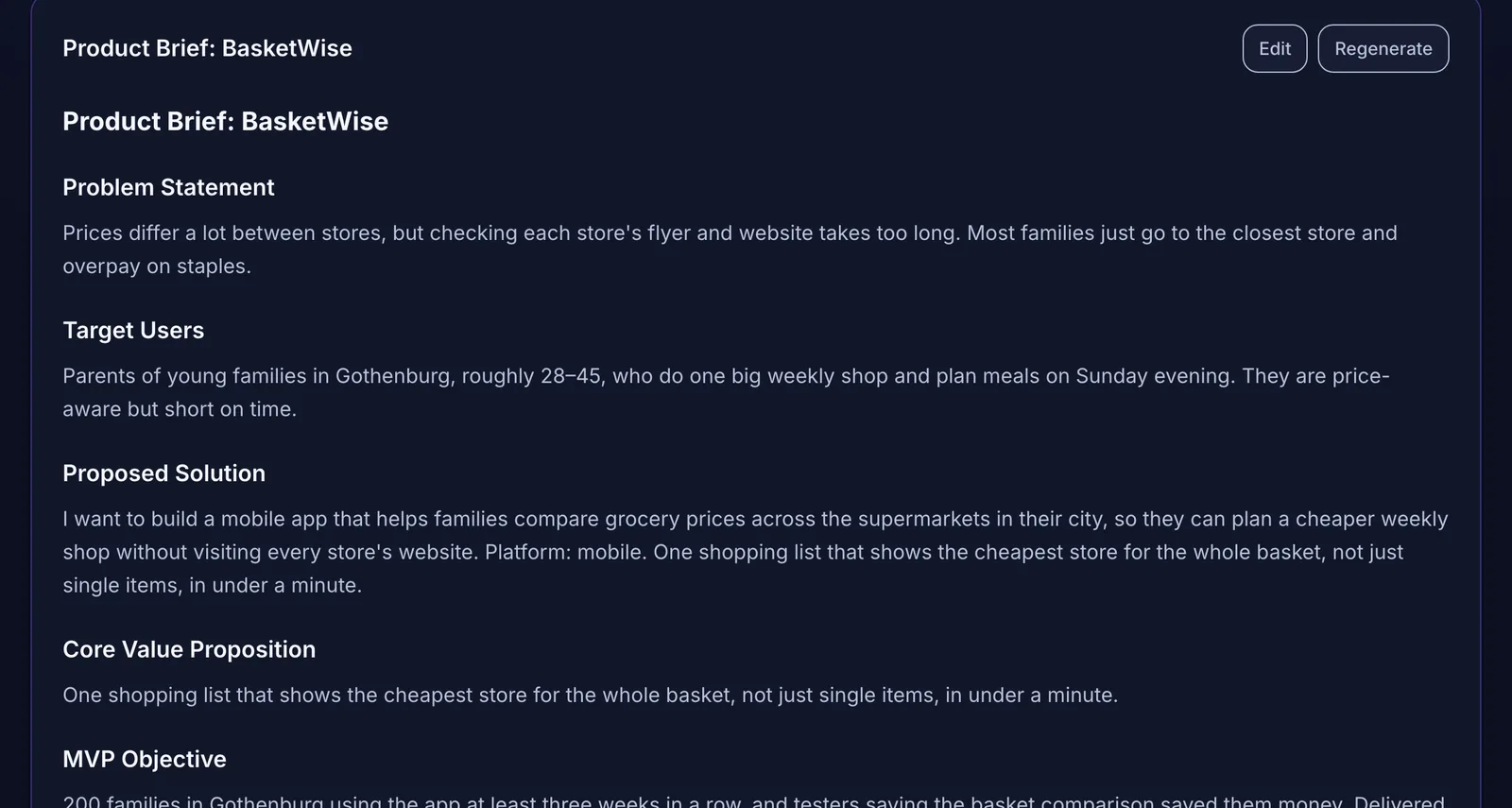 A product brief generated from interview answers. Every section stays editable.
In this example (a grocery price comparison app for families in Gothenburg), the value proposition reads: one shopping list that shows the cheapest store for the whole basket, not just single items, in under a minute. Every requirement that follows should serve that sentence.
Step 3: Draft scope with an explicit exclusion list
Next, ask for the scope:
Based on the brief, propose the MVP scope as must have, should have, and not in this version. For each excluded item, give a one-line reason. Be strict: a must-have is something without which the value proposition fails.
Then cut further yourself. The AI's must-have list will usually be too long. The exclusion list is the part of the PRD that saves the most time and money, because it stops AI tools and humans from building what you didn't ask for.
Step 4: Write requirements as acceptance criteria
This is where most PRDs written with AI go wrong. The AI produces requirements like "The system should provide a seamless store selection experience." That can't be built or checked.
Ask for testable criteria instead:
For each must-have feature, write three to six acceptance criteria. Each criterion must describe observable behavior that a non-technical person can check by using the app. No implementation details.
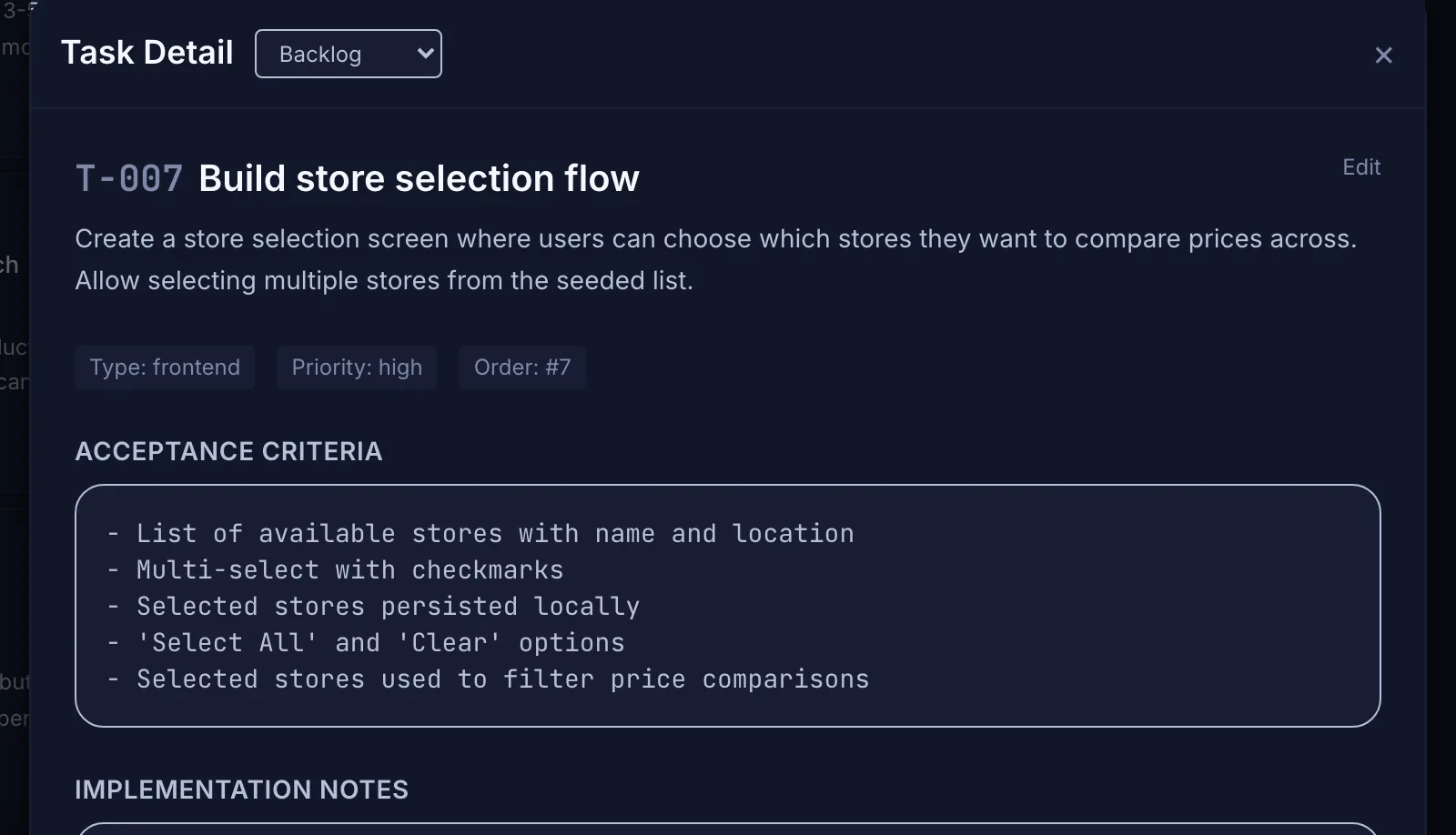 Requirements only help an AI coding tool when they become testable acceptance criteria on a task.
Weak versus strong:
For tricky behavior, use the Given, When, Then format: "Given a shopping list with ten items, when the user opens the comparison, then the total for each selected store is shown, with the cheapest highlighted."
Step 5: Add non-functional requirements and constraints
AI drafts often skip these, and they are the ones that hurt later:
Step 6: Use AI as a critic
Once the draft is complete, switch roles. Give the AI the whole PRD and ask it to find problems:
Review this PRD as a skeptical engineering lead. List: requirements that can't be tested, contradictions between sections, missing edge cases, features in the requirements that aren't in the scope, and assumptions that should be open questions. Don't rewrite the document; just list issues.
This review step catches more problems than the drafting step creates. Fix what's real, ignore what isn't, and move unresolved items to open questions.
Common PRD mistakes when using AI
From PRD to tasks
A PRD becomes buildable when each must-have feature is split into tasks that carry their acceptance criteria. The guide to turning client requirements into development tasks shows that step in detail, and planning an MVP before using Lovable, Bolt, or Cursor covers how to hand the result to a build tool.
Writing your PRD with Mogryat
Mogryat breaks the PRD into the same stages. A founder interview collects the answers, then Mogryat generates a product brief (problem, users, solution, value proposition, MVP objective, assumptions, risks, success criteria), an MVP scope with must-have, should-have, could-have, and not-in-v0.1 sections, an architecture recommendation from your constraints, and a technical plan. The task board then turns requirements into tasks with acceptance criteria and AI execution prompts.
Each document is editable and can be regenerated, so the AI drafts and you decide. It won't tell you whether your market exists. That still comes from talking to users.
Draft your PRD from a guided founder interview →
Want to see the process end to end first? Read from app idea to launch.