Most token waste in AI-assisted development comes from three places: long sessions that resend a growing history on every turn, oversized context (whole files, full logs, every doc "just in case"), and rework caused by vague tasks. The biggest savings come from scoping each task tightly with acceptance criteria, starting a fresh session per task, loading only the context that task needs, and routing simple work to cheaper models. Prompt caching and output limits help, but they don't fix a task that had to be done three times.
This article breaks down where the tokens go, the tactics that reduce them most, and how to measure whether it's working.
Where tokens actually go
A typical agentic coding session spends tokens on:
- Conversation history. Chat-style APIs are stateless: each request includes the conversation so far. A session that started small can be sending tens of thousands of tokens per turn by the end. Caching reduces the price of repeated prefixes on providers that support it, but the volume still grows.
- File reads. Agents read files to understand code. Large files, generated files, and lock files are expensive and rarely useful.
- Tool output. Test runs, build logs, and stack traces can be thousands of lines. Usually only a few lines matter.
- Always-loaded instructions. Rules files and system prompts are sent with every request. A bloated rules file costs you on every turn.
- Output. Generated code and explanations. Output tokens are typically priced several times higher than input. In Anthropic's published pricing as of October 2026, output costs five times as much as input across its current models (Anthropic pricing in the prompt caching docs).
- Rework. Every run that produces the wrong thing repeats most of the above.
- One observable outcome
- Three to six acceptance criteria
- The constraints that matter (stack, conventions, what not to touch)
- Pointers to the files likely involved
- Reference files by path and let the agent read the parts it needs, instead of pasting whole files into chat.
- Exclude generated code, build output, lock files, and large fixtures from what the agent indexes or reads.
- Paste only the failing test and its error, not the full test run.
- Give the agent a short excerpt of a long document with a pointer to the rest.
- Small, fast models: classification, summarizing logs, formatting, simple boilerplate, renaming
- Mid-tier models: most feature work with clear acceptance criteria
- Largest models: ambiguous design questions, tricky debugging, multi-file refactors
- Ask for diffs or changed files only, not full rewrites of unchanged code.
- Ask for code without long explanations when you don't need them.
- Limit automatic retry loops. If an agent fails the same check twice, stop and fix the task description. A third attempt with the same input rarely helps.
- Tokens and cost per task, not just per month
- Number of runs per task (a rough rework indicator)
- Which task types cost the most
- Monthly spend against a limit
- Switching tools without changing habits. Long, unfocused sessions are expensive everywhere.
- Bigger context windows. They raise the ceiling, not the efficiency. Research on long contexts found models often use information in the middle of long inputs less reliably than information at the start or end (Liu et al., TACL 2024).
- Very terse prompts. Cutting necessary context to save tokens often causes rework that costs more.
- Anthropic documentation: Prompt caching and pricing
- OpenAI documentation: Prompt caching
- Cursor documentation: Rules
- Claude Code documentation: Context window
- Liu et al., "Lost in the Middle"
Rework is the one people undercount. A task done twice costs at least twice as much, plus the tokens spent explaining what was wrong.
Tactic 1: Scope tasks tightly, with acceptance criteria
The cheapest token is the one you never spend on a wrong attempt. Before handing a task to an agent, make sure it has:
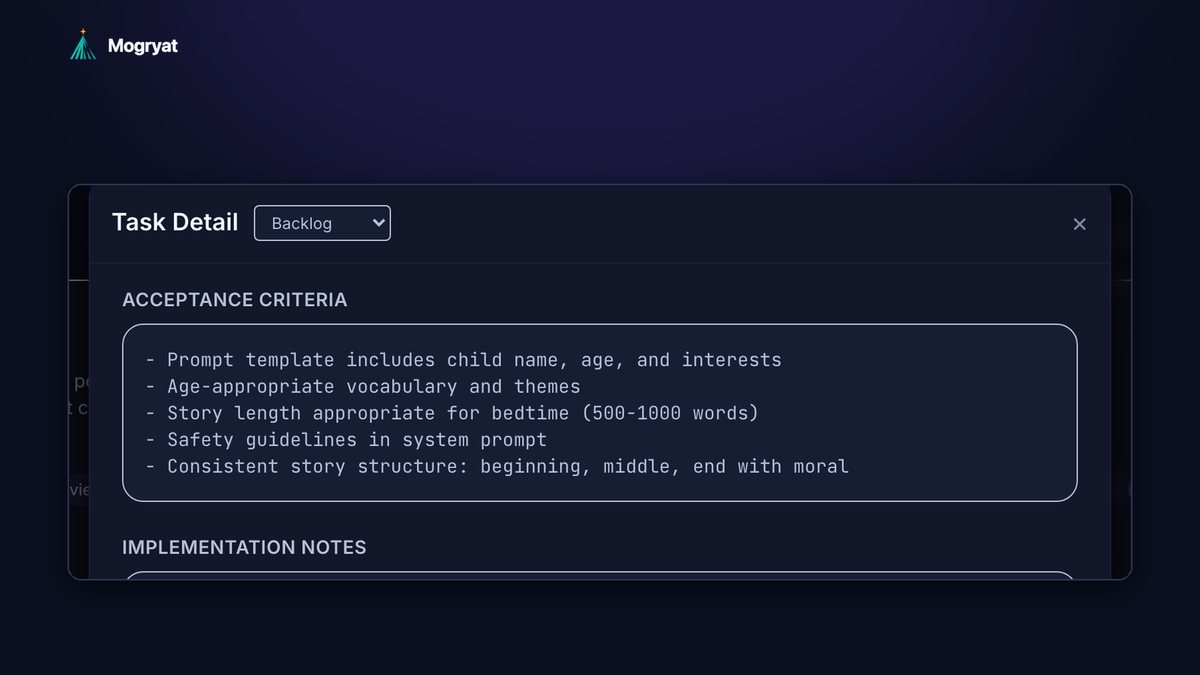
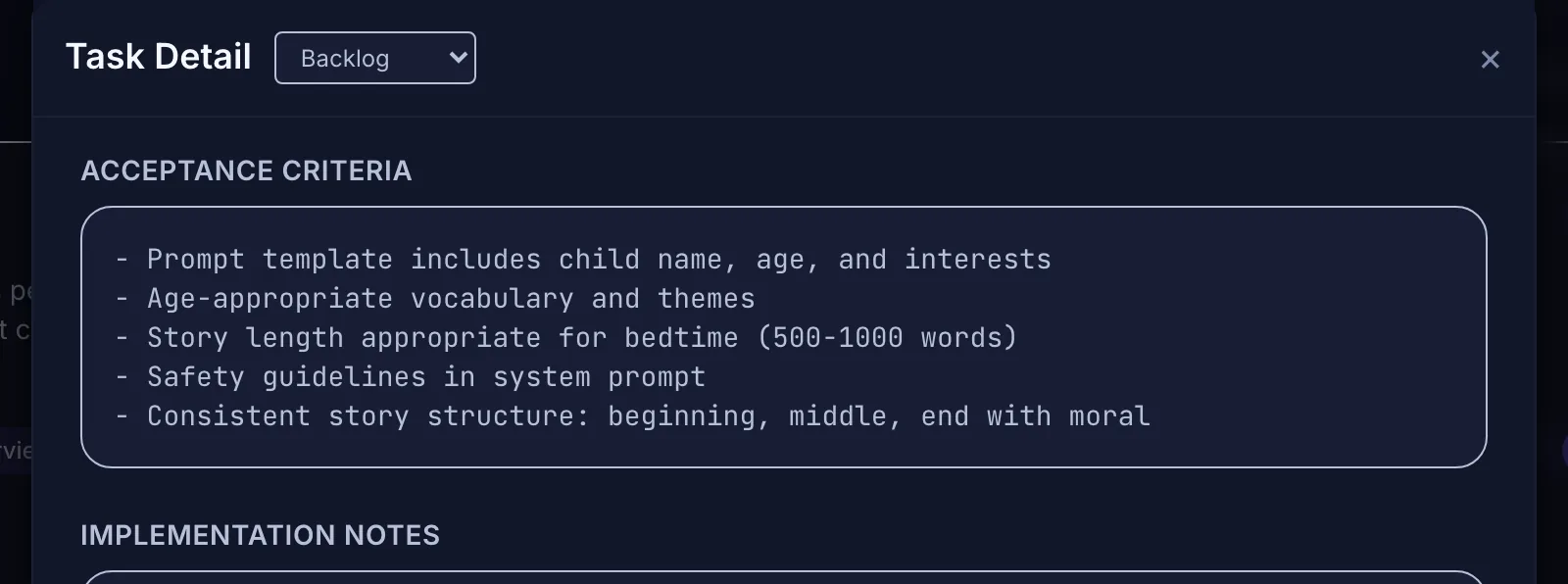 A scoped task with explicit acceptance criteria gives the agent a stopping point.
Acceptance criteria also give the agent a stopping condition. Without them, agents tend to keep "improving" things you didn't ask for, which costs tokens and review time.
Tactic 2: One task per session
Start a new session when you start a new task. Carrying a debugging conversation into a feature build means every new message pays for context that no longer matters.
If a task is long, end the session with a short handoff note (what's done, what's next, decisions made) and start the next session from that note instead of letting the history grow indefinitely. Many tools can summarize automatically (Claude Code's /compact, for example), but a note you write or check yourself keeps the decisions that matter (Claude Code docs).
Tactic 3: Keep always-loaded context short
Your rules file is sent constantly. Keep it to the facts every task needs: stack, commands, conventions, hard rules, and links to deeper documents. Cursor recommends keeping rules under 500 lines and splitting larger ones (Cursor docs). Put area-specific guidance in path-scoped rules or separate docs that load only when relevant.
The guide to keeping coding agents from losing context explains how to split context into layers so you load less without losing anything.
Tactic 4: Point, don't paste
Tactic 5: Ask for the plan before the code
Ask the agent to describe its plan in a few sentences before it writes anything. A plan costs a few hundred output tokens. A wrong implementation costs thousands, plus the fix. If the plan is wrong, correct it and save the run.
Tactic 6: Route work to the right model
Not every task needs the most capable model. As a rough split:
The price gaps are large. In Anthropic's October 2026 list prices, input for its smallest current model costs a fraction of the largest. Check your provider's pricing page; prices change often.
Tactic 7: Structure prompts so caching works
Prompt caching lets providers reuse the processing of an identical prompt prefix at a lower price. Anthropic's documentation describes cache reads billed at a fraction of base input (0.1 times for most models at the time of writing), cache writes at a premium (1.25 times for the default five-minute cache), and a default cache lifetime of five minutes (Anthropic docs). OpenAI documents automatic caching for repeated prefixes as well (OpenAI docs).
To benefit, put stable content first (instructions, project context, tool definitions) and variable content last. Editing the beginning of the prompt invalidates everything after it.
If you use an IDE or CLI agent, it probably handles caching for you. Your lever there is not changing the always-loaded context mid-session.
Tactic 8: Cap output and retries
Tactic 9: Use deterministic tools where they fit
Formatting, linting, scaffolding, renaming, and simple code generation from templates don't need a language model. A formatter is free, instant, and always correct. Save model calls for work that needs judgment.
Measure before and after
You can't reduce what you don't see. Track at least:
An illustrative example of why this matters: suppose a session averages 40,000 input tokens per turn over 30 turns. That's 1.2 million input tokens. If the same task were scoped well enough to finish in 10 turns of 15,000 tokens, it would use 150,000, roughly an eighth. Those numbers are assumptions for illustration, not a benchmark, but the shape is typical: shorter, focused sessions win by a wide margin.
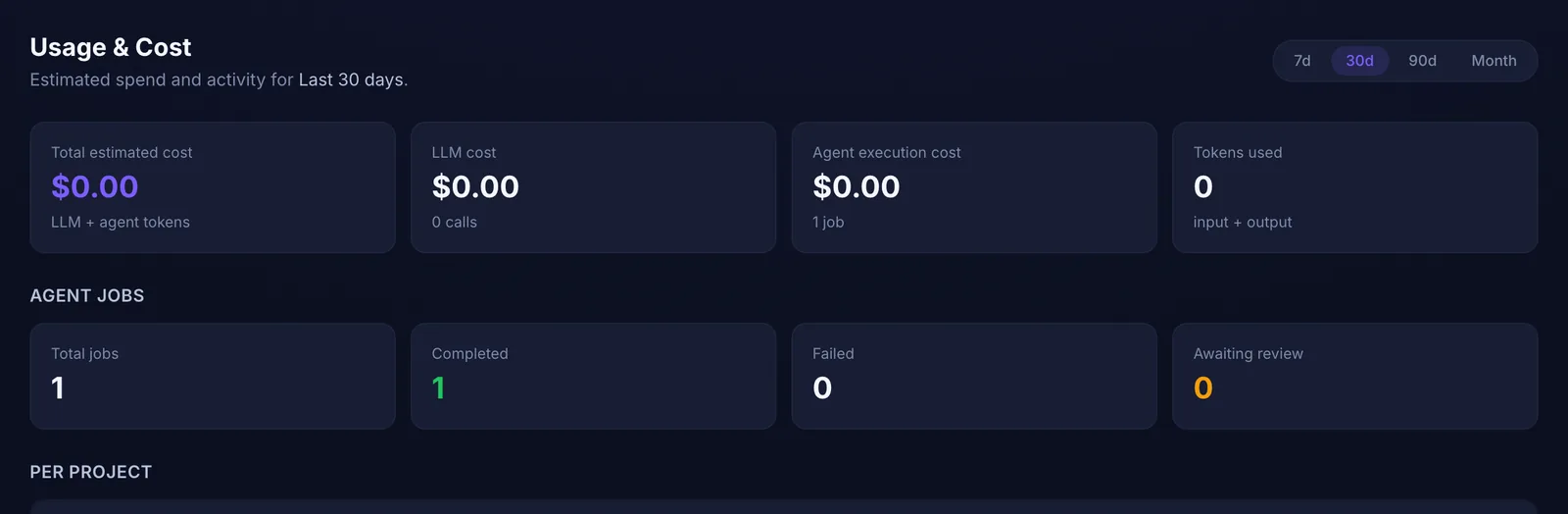 You cannot reduce what you do not measure. (Demo runs on a test account, so values are zero.)
What doesn't help much
If you work for clients, the client-project version of these habits adds per-client context packs and retry limits.
How Mogryat reduces token use
Mogryat is designed around the tactics above. Product context is written once (brief, scope, architecture, technical plan) and each task gets a focused AI execution prompt containing the project context and that task's requirements, so you don't paste the project story into every session. Tasks come with acceptance criteria, which reduces rework.
Mogryat also uses deterministic generators where they're practical, so some planning steps don't need a model call at all. The usage page shows estimated LLM and agent execution cost, tokens used, and a usage history with input and output tokens per operation. You can set a monthly spend limit with warnings at 80% and 95% and an optional hard block. With your own API keys, model costs go straight to your provider account.
It won't optimize prompts you write by hand in other tools. The habits in this article still apply there.
For the bigger picture, see how to turn a business idea into an MVP and how to write a PRD with AI, which cover the planning that makes tasks small enough to be cheap.
See where your AI development spend goes →